Guides & Insights
Hours and Payroll in Construction: A Complete Compliance Guide
August 19, 2026
27 min read

From documenting progress to solving disputes, a well-designed jobsite documentation app supports actual tasks workers face every day. It helps track progress easily, which lead to fewer misunderstandings.
Let’s look at why this kind of tool should be standard in every project toolkit.
Snapping the photo is easy. The trouble starts later, when you need that one shot from May and it’s somewhere between your kid’s school play and a screenshot of last week’s lunch order. A jobsite documentation app fixes this – every photo gets tied to a project and task automatically, so finding it later takes seconds, not an evening of scrolling. Once you’ve got the tool sorted, these practical tips for jobsite documentation help you actually use it well.
The right tool makes it easy to track progress, avoid misunderstandings, and keep everyone on the same page. On a smart jobsite, this kind of tool ensures that all documentation—photos, reports, and tasks—stays connected, visible, and securely stored in one place.
According to industry best practices, consistent photo documentation can reduce liability and improve accountability across complex builds.
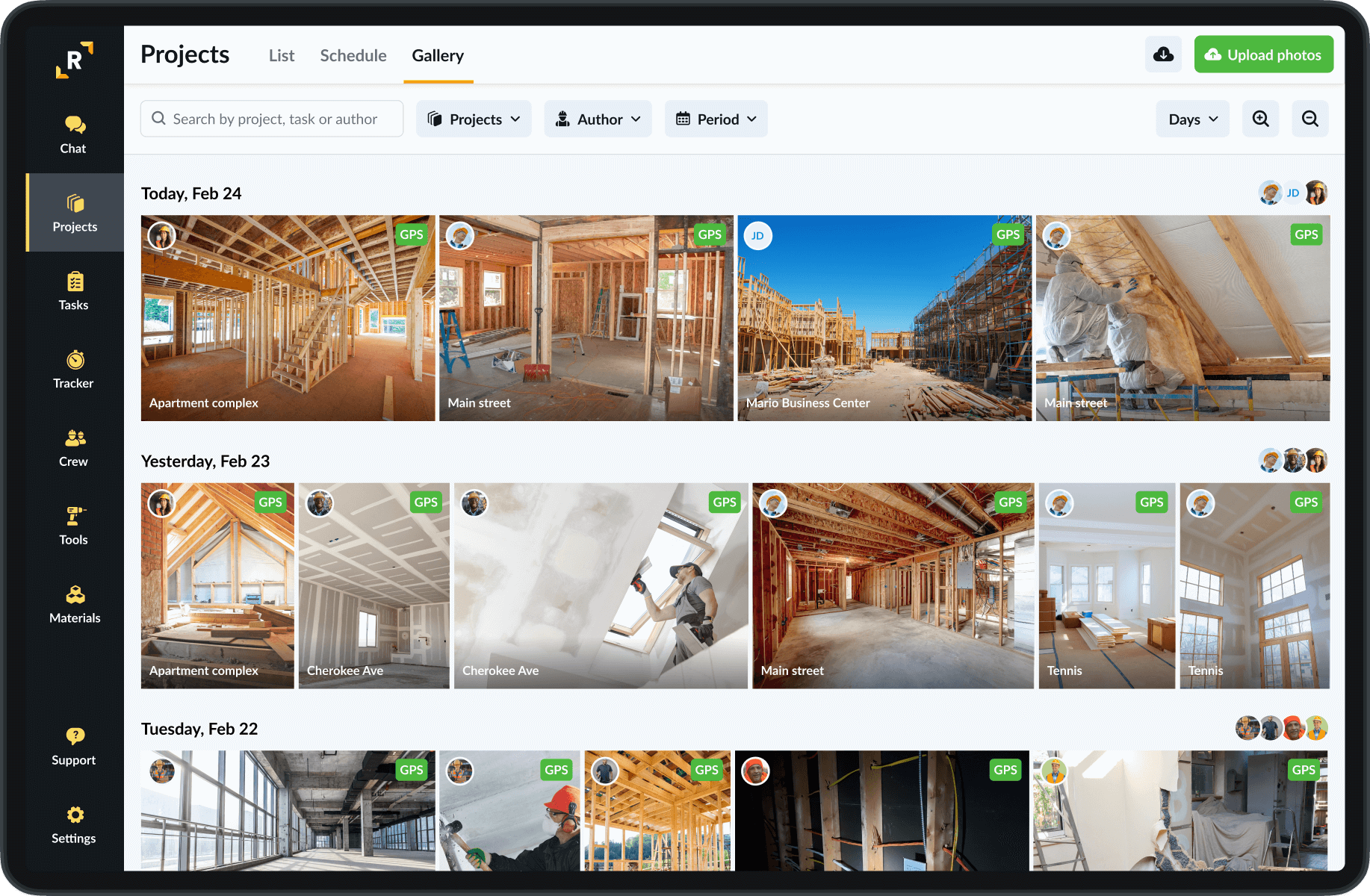
Not all apps are built equally. So, when evaluating your options, focus on functionality that genuinely supports fieldwork – not just flashy dashboards. Here’s what matters:
A high-performing construction photo app must include automatic organisation capabilities to sort images by project name, task, location, and date. This eliminates the inefficiencies associated with manual folder management and ensures that teams can access visual data within seconds. Furthermore, when documentation is clearly linked to site-specific tasks, it significantly enhances both team productivity and accountability. As construction projects often involve thousands of images, an intelligent filing system is essential.
For starters, automatic sorting by project name, task, date, and location is a must. A solid jobsite documentation app doesn’t ask you to play digital librarian. It does the sorting for you, freeing up your time for actual site management.
Secondly, a construction photo app should embed GPS coordinates and timestamps on every image to create a trustworthy audit trail. This metadata plays a crucial role in compliance reporting, inspection readiness, and dispute resolution. For example, during quality assessments or safety reviews, images with verified location and time data provide objective proof of site conditions. Consequently, using a construction photo app with GPS and timestamp functionality supports legal defensibility and transparency across stakeholders.
Job sites don’t always have strong signal. That’s why the best jobsite documentation app lets users take photos offline and sync them later.
In remote or signal-restricted construction environments, connectivity issues can cripple data collection. Therefore, a robust construction photo app must support offline image capture, with automatic synchronisation once the device is back online. This ensures continuous documentation without interruptions, particularly on large-scale infrastructure projects where mobile coverage is unreliable. Moreover, offline capability prevents data loss and maintains a steady documentation workflow regardless of network availability.
Visual clarity is vital in construction reporting. A feature-rich construction photo app should offer annotation tools such as arrows, highlights, or text boxes that allow users to mark up images directly. This functionality improves communication by allowing site staff to visually point out installation issues, safety hazards, or progress milestones. In addition, annotated images serve as clearer references during remote inspections, contractor meetings, or client updates, where visual evidence must speak for itself.
A construction photo app that links images to tasks and time logs provides multi-dimensional project context. This integration ensures that every photo tells not only what happened, but also when and by whom. For instance, if a subcontractor claims work completion, managers can instantly verify it through time-stamped, task-linked imagery. As a result, construction companies benefit from improved traceability, faster approvals, and reduced billing disputes.
Collaboration in construction often involves external parties like clients, inspectors, or subcontractors. A construction photo app that allows selective sharing with granular access control ensures that stakeholders receive only the information they need—without compromising data privacy. Moreover, by enabling instant sharing from site to office or from project manager to client, communication is streamlined and response times are accelerated.
A modern construction photo app stores images securely in the cloud, enabling access from any device and eliminating the risk of data loss due to device failure. Furthermore, version control features allow users to track updates to image sets or annotations over time, maintaining a clear history of site changes. Centralised storage also supports scalable project documentation, making it easier to manage large volumes of imagery from multi-site operations.
Construction teams are increasingly multilingual, especially in regions with large foreign labor forces. A construction photo app that offers a multi-language user interface can reduce errors caused by language misunderstandings and improve team adoption. In addition, such localization makes onboarding faster for new workers, particularly in projects spanning different countries or involving subcontractors from diverse backgrounds.
Therefore, a jobsite documentation app with multilingual options reduces miscommunication and helps everyone get started faster.
Finally, a construction photo app should allow users to generate structured reports that combine images, annotations, and metadata into a professional document format such as PDF. These reports are indispensable for client updates, investor briefings, or regulatory submissions. Furthermore, the ability to compile and export visual records quickly enhances operational efficiency and strengthens credibility during project audits.
Many construction teams start with WhatsApp or cloud storage to manage jobsite photos, they’re already installed and sharing takes seconds. But as projects grow, those quick fixes create their own problems: photos become hard to find, context disappears, and documentation scatters across chats and folders. Here’s how a dedicated tool compares to the most common alternatives:
| Feature | Jobsite Documentation App (e.g. Remato) | WhatsApp / Messenger | Cloud Storage |
| Photo Organization | ✅ Auto-sorted by project, task, date, and GPS | ❌ Mixed in chats | ⚠️ Depends on folders |
| Search & Retrieval | ✅ Fast and reliable search | ❌ Very limited | ⚠️ Manual and inconsistent |
| Context (tasks, notes) | ✅ Linked to tasks and updates | ❌ No context | ❌ Not connected to work |
| Team Access | ✅ Shared across the whole team | ⚠️ Only chat members | ⚠️ Depends on setup |
| Offline Use | ✅ Works offline, syncs later | ⚠️ Limited | ❌ Usually requires internet |
| Progress Tracking | ✅ Visual timeline of work | ❌ Not supported | ❌ Not supported |
| Reporting | ✅ Automatic reports (PDF) | ❌ Manual screenshots | ❌ Manual export |
| Accountability | ✅ Who, when, where tracked | ❌ No tracking | ⚠️ Limited metadata |
Remato focuses on straightforward, field-ready solutions. It’s a jobsite documentation app that prioritizes speed, clarity, and simplicity. You won’t find vague buzzwords or useless extras. Instead, you’ll get a tool that helps you work better, communicate faster, and keep your project organized from the ground up.
Whether it’s offline access, GPS tagging, annotation tools, or PDF reports, Remato offers practical features that support real-world construction work. And since every team is different, the app is built to be flexible—without becoming overcomplicated.
A good jobsite documentation app doesn’t need to sell you a new future. It just needs to help you stay focused on the build.
The most important features are automatic photo organization by project and task, GPS and timestamp tagging, offline mode with auto-sync, and the ability to generate PDF reports. A jobsite documentation app should also link photos to specific tasks and team members for accountability. If the app requires you to manually organize files, it defeats the purpose.
Most modern jobsite documentation apps can be set up in under 30 minutes. The basic flow is: create a project, invite team members, and start capturing photos. There’s no folder structure to design or files to migrate manually, the app organizes photos automatically as they’re taken. Full team adoption usually takes 1–2 weeks of consistent use.
The most effective ones capture every photo with context: timestamps, GPS location, and task details. The best apps add this metadata automatically so crews don’t have to think about it.
Yes, but only if the app is designed for it. Look for offline mode with automatic sync, the app should let crews capture photos without internet, then upload everything when the device reconnects. Without true offline support, work in basements, tunnels, or remote sites becomes a documentation gap. Test this feature before committing to any app.