{{ post.date }}
{{ post.readTime }}

Everyone asks the same questions: Who was there? When did they arrive? How many hours did they work? Which project or task were those hours for? Was the worker qualified? Who approved the hours? Can we prove it?
Thats when shift scheduling software comes to play for subcontractors.
Subcontractors do not struggle with shift scheduling because they cannot make a calendar. They struggle because construction work changes constantly.
Crews move between sites. Workers have different qualifications. Foremen approve hours manually. Payroll depends on messy timesheets. Project managers want to know where labor cost is going. Workers want to be paid correctly. Main contractors want proof that work was done.
When we built Remato, we talked to dozens of subcontractors across Europe before writing a single line of code. The same pain came up every time: not the work itself, but the chaos around proving it was done, by whom and at what cost.
The best shift scheduling software is not the one with the most features. It is the one that actually gets used on site and helps subcontractors answer the questions that affect pay, cost, compliance and project profitability.
This article tells you what shift scheduling is, why it matters specifically for subcontractors, what the law requires in five key European markets and what to actually look for in shift planning tool that your crews will use and your business will benefit from.
Shift scheduling is the process of assigning workers or crews to specific work periods.
In a basic business, that might mean:
Anna works Monday from 09:00 to 17:00. Mark works Tuesday from 08:00 to 16:00.
In subcontracting, it is more specific.
A construction subcontractor usually needs to know:
Worker or crew:
Shift scheduling is about the people doing it – the day-to-day deployment of your workforce within whatever window your project schedule gives you. If you want to understand how that project schedule gets built in the first place, our construction scheduling guide covers the methods, from CPM to the Last Planner System, that determine the window your crews are working inside.
Done badly, shift scheduling is a series of phone calls. Done well, it is a system: documented, transparent and connected to your payroll, your compliance obligations and your project costs.
Subcontractors usually start with simple tools. That is normal. Paper, chats, and spreadsheets can work when the company is small.
The problem appears when the company grows, when more sites are added, when payroll becomes harder, or when managers need reliable project-cost data.
Physical rosters, site logbooks, and handwritten timesheets are still common – particularly for smaller operations. The foreman writes names on a page. Workers sign in when they arrive. At the end of the week, the sheets go to the office.
Strengths: Simple to start, no technology required, no training needed.
Weaknesses: Easily lost, damaged, or altered. No real-time visibility. Difficult to aggregate across multiple sites. Cannot be searched or audited efficiently. In an increasing number of European countries, paper-based time recording is being phased out legally (more on that in the legal section below). And crucially when a disagreements arise, a piece of paper with a foreman’s handwriting is a weak defence.
Most subcontractors today run on WhatsApp or similar messaging. Schedules go out in group chats. Workers confirm or don’t. Changes happen in threads that nobody can fully trace a week later.
Strengths: Immediate, familiar to everyone, works across languages.
Weaknesses: No permanent, structured record. Messages get deleted, buried, or missed. There is no searchable audit trail. A confirmation in a chat thread is not a signed timesheet. Workers can claim they never received a message. The GC cannot see or verify your scheduling data. And when a payroll dispute or insurance claim arises, reconstructing what happened from a chat history is unreliable and time-consuming.
Spreadsheets are the step up from chaos. Many subcontractors build their own systems – tabs for each site, rows for each worker, colour-coding for shifts. Some are genuinely impressive.
Strengths: Flexible, free or cheap, familiar to office staff, allows some aggregation.
Weaknesses: Manual – every change requires someone to update the file. Version control is a constant problem: which sheet is current? Spreadsheets don’t send notifications to workers, can’t track real-time attendance, don’t flag when someone is heading into overtime and require manual transfer to payroll systems. They also break completely when you scale, a 15-person operation with three active sites generates more data than most spreadsheet setups can handle gracefully. And they offer zero compliance protection.
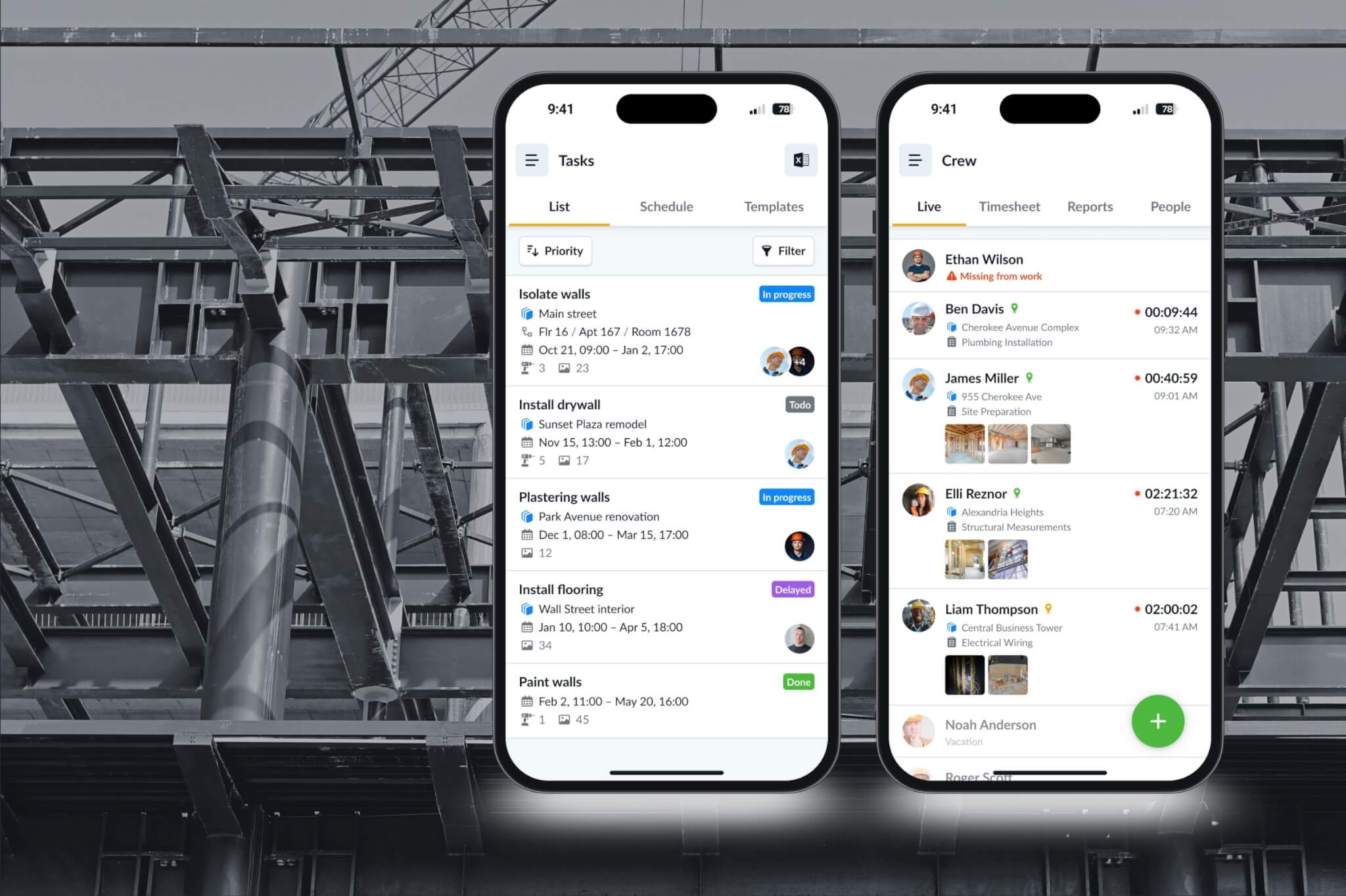
Purpose-built shift rota software changes the operational model. The schedule lives centrally, workers access it on their phones, clock-ins are recorded automatically and the system connects to payroll. Changes push out as notifications. Managers see all sites at once. The data is timestamped, GPS-verified and exportable for compliance purposes.
For subcontractors, a subcontractor scheduling app or shift rota software only works if it fits the way crews actually move between sites, supervisors and tasks.
Strengths: Real-time visibility, automated time tracking, payroll integration, compliance documentation, scalable across multiple sites and workers.
Weaknesses: Requires setup and adoption. Workers need to use the app consistently. Some platforms are built for retail or healthcare and don’t fit construction workflows. Cost. And if the software requires a stable internet connection, it fails on many construction sites.
The honest summary: paper and chats work until they don’t and they stop working the moment you have more than one site, more than ten workers, or a labour inspector asks for documentation you can’t produce.
| Tool | Strengths | Weaknesses |
|---|---|---|
| Paper | Simple, cheap, familiar | Easy to lose, hard to update, poor audit trail |
| WhatsApp / Messenger / SMS | Fast, familiar, good for urgent updates | Unstructured, hard to prove, messages get buried |
| Excel / Google Sheets | Flexible, cheap, useful for planning | Version-control issues, weak mobile workflow, manual payroll |
| Scheduling software / app | Live schedule, time tracking, approvals, project cost, payroll data | Needs adoption, setup and training |
For a deeper look at why standard tools fall short for specialty subcontractors, this breakdown covers the two-layer problem most scheduling apps miss.
This section is not legal advice. Working-time rules depend on the country, employment status, collective agreement, industry, posted-worker rules and contract type.
Most EU countries are influenced by the EU Working Time Directive. At a high level, the directive protects workers through rules on maximum weekly working time, daily and weekly rest, breaks and paid annual leave. The EU’s Your Europe guidance states that employers must ensure staff do not work more than 48 hours per week including overtime, although the limit may be averaged over a reference period depending on national rules.
This does not replace local law. Poland, the Netherlands, Spain and Greece each apply working-time rules through their own systems. Norway is not an EU member, but it has its own working-time and HSE requirements.
For subcontractors, the important point is this: working-time compliance requires records.
You cannot prove rest periods, overtime, night work, or project hours if all you have is a WhatsApp message. This is exactly why digital shift planning tools exist, not to add administration, but to generate the proof that compliance requires.
Polish government guidance explains that standard working time is generally based on 8 hours per day and an average 40 hours per week in an average five-day working week within the adopted reference period. [source]
Polish government guidance also states that workers are entitled to at least 11 hours of uninterrupted daily rest and at least 35 hours of continuous weekly rest.[source]
For subcontractors employing workers in Poland, practical records should usually be able to show:
What this means for subcontractors: Every hour your workers put in must be documented and defensible. If you bring Polish workers to sites in other EU countries, the posted workers rules require you to demonstrate compliance with the host country’s minimum wage and working conditions – which requires the same documented hours you need at home.
The Dutch Working Hours Act sets limits on working time and rest. Dutch government guidance says employees aged 18 and over may work a maximum of 12 hours per day and 60 hours per week, but not every week; averages are limited to 55 hours per week over four weeks and 48 hours per week over 16 weeks. The Dutch Labour Authority also states that the Working Hours Act applies to employees aged 18 and older who work for an employer, including interns, agency workers and posted workers.
For construction subcontractors, the Netherlands can also involve posted-worker rules and chain-liability concerns. The official posted-worker guidance says posted workers are entitled to core Dutch employment terms, including minimum wage, working-hours rules, sufficient rest, safe working conditions, equal treatment and minimum days off. [source 1, 2, 3]
Practical records to maintain:
What this means for subcontractors: Since minimum wage is now calculated hourly rather than monthly, you cannot pay a fixed monthly amount and ignore actual hours worked. Every hour must be tracked. A construction subcontractor with variable daily hours – six hours one day, ten the next – needs a system that captures this accurately, or faces exposure to both underpayment claims from workers and enforcement action from authorities.
Norway places strong emphasis on working-time records and construction-site identification.
The Norwegian Labour Inspection Authority says all time spent in the service of the employer must be registered as working hours. It also says employers must have a routine for registering working hours, employees must be informed of that routine, and start and end times should generally be recorded.
Norway also has HSE card requirements in construction. The Labour Inspection Authority says it can check whether employees have valid HSE cards and if workers cannot present valid cards, the authority may order the employer to obtain cards, suspend operations, issue fines, or report serious cases to the police. [source 1 and 2]
Practical records to maintain:
What this means for subcontractors: Operating in Norway requires significant upfront registration work before a single worker steps on site. Knowing which workers you are sending, when and in what roles is not optional – it is the prerequisite for legal site access. A subcontractor scheduling app that tracks worker assignments and documents deployment dates is directly relevant to meeting these obligations.
Spain has strict working-time registration expectations. The Spanish Ministry of Labour’s guidance on working-time registration says companies must keep records for four years and make them available to workers, worker representatives and the Labour and Social Security Inspectorate. Spain’s official guidance for posted workers also lists working-time records showing the start, end, and duration of the daily working day among documents that may need to be available.
Spain has also been moving toward stronger digital recording. A 2025 Spanish government draft text proposed that all companies guarantee daily working-time records by digital means,and that the system be objective, reliable and accessible. [source 1 and 2]
Practical records to maintain:
What this means for subcontractors: If you have workers in Spain, you need a digital system that records daily start and end times and stores that data for four years. A paper timesheet or a WhatsApp confirmation does not meet this requirement. Inspections are increasing, and the financial exposure per worker is significant.
Greece has been expanding digital working-time controls. The European Labour Authority’s good-practice fiche on the Hellenic Digital Labour Card says Greece introduced digital cards for recording working time in phases, beginning with banks and supermarkets in 2022 and that mandatory digital registration of working time applied to all employers from October–November 2022. Greece’s gov.gr page for the Ergani CardScanner app describes employer functionality including employee identification details, contractual weekly working hours and five-day or six-day employment status.
Greece has also had recent working-time reforms. Reuters reported in October 2025 that Greece passed a law allowing private-sector employers to extend workdays up to 13 hours in certain circumstances, with controversy and worker protests; the report also noted limits such as extended shifts being capped at 37 days annually and protection against dismissal for refusing overtime. [sources 1, 2, 3]
Practical records to maintain:
What this means for subcontractors: In Greece, scheduling and time recording are effectively merged into a single government-mandated system. A subcontractor operating in Greece needs software that can either integrate with ERGANI II directly or ensure their workers can use the Digital Work Card correctly. Manual systems are legally non-compliant.
Beyond fines and inspections, there is a human dimension to these registration requirements that subcontractors often overlook and that their workers care about deeply.
In most European countries, recorded and registered working hours are the foundation of workers’ social entitlements. In the Netherlands, hours determine minimum wage eligibility and pension contributions. In Norway, registered employment is the basis for NAV (social insurance) benefits including unemployment payments and sick pay. In Poland, properly recorded work feeds into ZUS (social security) contributions that build pension rights. In Greece, ERGANI II data directly feeds into workers’ EFKA (social insurance) records.
The parallel most workers understand instinctively is Estonia’s e-Residency and digital government model, where registered employment automatically triggers social benefits including healthcare access. The principle is the same across Europe: if you are not registered, you do not officially exist in the social system. For migrant workers far from home – Polish workers in Norway, Romanian workers in Greece, this is not abstract. An undocumented shift is a shift that builds no pension, earns no sick pay entitlement and disappears if there is ever a dispute.
When your workers understand that the scheduling system is also what makes their hours count for their benefits, adoption improves dramatically.
For me, the real advantage of subcontractor scheduling software is that it turns daily field activity into usable business data without forcing managers to chase every detail manually.
This sounds simple right, but actually it is the most important point.
The best scheduling software for construction subcontractors is not enterprise HR software simplified. It is a mobile-first tool built around how field operations actually work: a manager/shift planner assigns workers to a site, workers see the assignment on their phones, they clock in when they arrive and that data flows automatically to the back office. The software must be super easy for the field crew, not only powerful enough for the office.
I do not think automated shift planning should replace site managers; I think it should remove the repetitive admin that keeps them from managing the work properly.
When it is easy, when it takes a manager thirty seconds to assign tomorrow’s crew and workers tap one button to clock in – adoption happens naturally. When it requires navigating menus and filling in forms, people go back to WhatsApp.
The test is simple: give the app to your most technology-resistant worker and see if they can clock in without training. If they cannot, the software will not be used in the field, which means the data will not exist, which means none of the other benefits come to life.
Without a scheduling system, payroll is a reconstruction exercise. Someone gathers timesheets from multiple sites, reconciles them against a roster, manually calculates regular hours and overtime, and enters it into a payroll system. Every step in that process is an opportunity for error.
The average manual payroll error rate is between 1% and 8%. For a construction subcontractor with 15 workers earning €25 per hour for 40 hours per week, a 3% error rate over a year represents thousands of euros in either overpayments or underpayments. Underpayments create legal liability. Overpayments destroy margin.
Scheduling software with integrated time tracking eliminates most of this. Hours are captured automatically when workers clock in and out. Overtime is calculated by the system using the correct rules for the relevant country. The payroll export is a review-and-approve process rather than a data-entry exercise. Payroll that used to take half a day now takes an hour.
This is where the financial value of automated shift planning software is clearest and most immediate.
Paper timesheets depend on honesty and accurate memory. The average timesheet inflation in manual systems is 4.5 hours per worker per week. For a subcontractor with ten workers, that is 45 phantom hours per week, hours you are paying for that did not happen. Over a year, at construction labour rates, that sum is significant.
GPS-verified clock-ins change the dynamic entirely. The system records when each worker arrived at the correct site, when they left and how many hours elapsed. That record is timestamped and geotagged. It cannot be retroactively adjusted without a clear audit trail.
This matters in three different directions. First, it prevents timesheet inflation – workers know their hours are objectively tracked. Second, it gives you evidence in disputes with workers who claim hours that the record does not support. Third, it gives you evidence in disputes with ge eneral contractors who claim work was not done or not done on time, your GPS-verified records show your crew was on site.
Certified payroll requirements in Spain, Greece, Norway and the Netherlands all require this kind of objective, auditable record. It is both a legal compliance tool and a commercial protection.
A subcontractor’s liability does not end when work is completed. If an uncertified worker performed work that required certification and something goes wrong, the subcontractor is exposed, regardless of whether the work itself was physically dangerous.
Managing certifications manually – tracking CSCS cards, first aid certificates, equipment licences, asbestos awareness training, specialist trade qualifications – across a workforce of fifteen or more people is genuinely difficult. Expiry dates get missed. Renewals happen late. Workers show up to sites without current documentation and are turned away, wasting a half-day of labour.
Examples of qualifications and certifications:
That is a major advantage for subcontractors because many construction tasks depend on specific skills and permissions.
Labour is the dominant cost in subcontracting. Depending on the type of work, labour typically represents between 30% and 50% of total project cost and in labour-intensive trades like electrical, plumbing, or formwork, it can exceed 60%. This means that a subcontractor who does not know their exact labour hours does not actually know their project cost.
They know their estimate what they quoted the general contractors but they do not know in real time whether they are on track, over, or under. The consequences of this are serious and consistent: subcontractors discover they have run over on labour at the end of a project, when it is too late to do anything except absorb the loss. This is one of the most common reasons profitable-looking jobs turn out to have thin or negative margins. Scheduling software with time tracking changes this from a retrospective discovery to a live dashboard. Consider what becomes visible when you know exactly how many hours each worker has logged on each project each day:
Research literature commonly identifies construction rework as a significant cost driver, one 2022 study notes that rework can directly affect contract value by 5% to 20%.
Bonus payments in construction are common and consistently contentious. Productivity bonuses, milestone bonuses, project completion bonuses. They are meant to motivate the workers who drive results. In practice, without objective data, they create exactly the resentment they are supposed to prevent. Scheduling software with time tracking creates the data layer that makes bonuses objective.
Why workers may resist tracking:
It is important to be honest: workers may not immediately love tracking software.
They may fear that tracking will be used to:
This resistance is understandable, especially if the company introduces software badly.
If the message is “we are watching you,” workers will resist.
If the message is “we want payroll, overtime, bonuses and site records to be fair,” adoption becomes easier.
Why accurate tracking can also benefit workers:
Accurate scheduling can help workers because it makes their contribution visible.
It can prove:
For good workers, objective records can be positive.
A strong bonus system should reward people who actually contribute. That is hard to do with paper notes and memory.
Workers often resist scheduling systems initially, seeing them as surveillance. The bonus connection reframes this: the same system that tracks their hours is the system that ensures their contribution is seen and rewarded. Workers who consistently show up, work full shifts and perform well benefit from objective data. Workers who have been inflating timesheets or taking long breaks do not – which is precisely the point.
For the employer, there is also a legal dimension. In an environment of increasing pay transparency requirements across the EU, bonus distributions that can be explained with documented data are legally defensible. Distributions that cannot be explained are increasingly open to discrimination challenges, particularly in mixed-nationality workforces where subjective impressions can unconsciously reflect bias toward workers who speak the manager’s language or come from the same background.
Choosing software is easier than getting it used. Most subcontractors who have tried and abandoned scheduling software failed not because the software was wrong but because adoption failed – workers didn’t use it, managers went back to WhatsApp and the data the system was supposed to capture never materialised. If you’re still evaluating options, this comparison of subcontractor scheduling tools covers eight platforms worth considering.
These are the five things that determine whether a scheduling system actually gets implemented and stays implemented.
This is non-negotiable.
If workers need five minutes to check in, they will avoid it.
What to look for:
The software should feel like part of the workday, not extra administration.
Automated timesheets are one of the biggest wins. It helps workers know what to do. It helps managers and supervisors approve work. It helps payroll pay correctly. It helps project managers and company owners understand cost.
The software should support:
This matters when there is a disagreement or a complaint.
Good software takes clock-in and clock-out data, applies the correct break rules and overtime thresholds for the relevant country, flags exceptions (missed clock-outs, unexpected absences, potential overtime breaches) and produces a ready-to-review timesheet.
Automated timesheets also reduces mistakes like:
Automated timesheets are especially useful when workers move between projects.
The construction workforce across Europe is deeply multilingual. Polish, Romanian, Portuguese, Lithuanian and Ukrainian workers are present on sites in Norway, the Netherlands, Germany and Spain. A scheduling app that operates only in the host country’s language or only in English – will not be used reliably by workers who are not comfortable in that language.
Misread shift times, misunderstood instructions and clock-in errors are all predictable consequences of a monolingual tool deployed to a multilingual workforce. The result is bad data, which defeats the entire purpose of the system. Multi-language support, including the ability for each worker to set their own preferred language is a requirement, not a feature.
The subcontractors who consistently make money and consistently get called for the next job are the ones who operate predictably. They confirm crew sizes before the project starts. They deliver within their window without burning into overtime. They can produce documentation when asked. They know at any moment whether a project is on track financially.
The right tool: mobile-first, multilingual, offline-capable and connected to payroll – pays for itself within months through reduced payroll errors, controlled overtime, faster dispute resolution and more accurate quoting. European labour law is also moving in one clear direction: documented, digital, auditable records of working hours are becoming mandatory across all five countries covered in this article and the penalties for non-compliance are rising.
The question for subcontractors is no longer whether to have a system. It is whether the system they have is good enough to protect them legally, give them operational visibility and help them build the kind of reliability that wins the next contract. If the answer is WhatsApp and a spreadsheet, the answer is no.
| Term | Meaning |
|---|---|
| Shift | A planned work period with a start and end time |
| Schedule | The plan showing who works where and when |
| Rota | Another word for work schedule, often used in Europe and the UK |
| Timesheet | A record of actual hours worked |
| Planned hours | Hours scheduled before the work happens |
| Actual hours | Hours actually worked |
| Crew | A group of workers assigned together |
| Project | The construction job or contract |
| Site | The physical place where work happens |
| Task | The specific work being done |
| Cost code | A way to assign labor cost to a project phase, task, or budget category |
| Approval | Confirmation from a supervisor that the hours or work are valid |
| Qualification | Proof that a worker is allowed or competent to perform certain work |
| Proof of work | Photos, notes, signatures, checklists, or other evidence that work was completed |