{{ post.date }}
{{ post.readTime }}

Walk onto almost any construction site and you’ll see the same scene: a manager gathers the crew in the morning, explains what needs to happen today, maybe sketches something on a piece of paper or sends a voice note on WhatsApp and then work begins. This system has existed for generations. And for small, stable crews working a single site with familiar work, it functions well enough.
But, there is a problem with that, questions arise!
Who confirmed that apartment 7 is finished? Where are the photos from yesterday’s pipe installation before the drywall went up? Which crew used the extra 8 meters of ventilation pipe and why? What do you send the client as proof that the roofing membrane was installed correctly? What happened to the torque wrench that was on Site B last Thursday? These are not problems caused by lazy or incompetent workers. They are structural problems that come up the moment construction work involves multiple crews, multiple sites, subcontractors, detailed materials, photo requirements, or any kind of reporting obligation. Managing teams across sites requires a structured system. Verbal task assignment simply has no mechanism for capturing, organising, or proving the work that gets done.
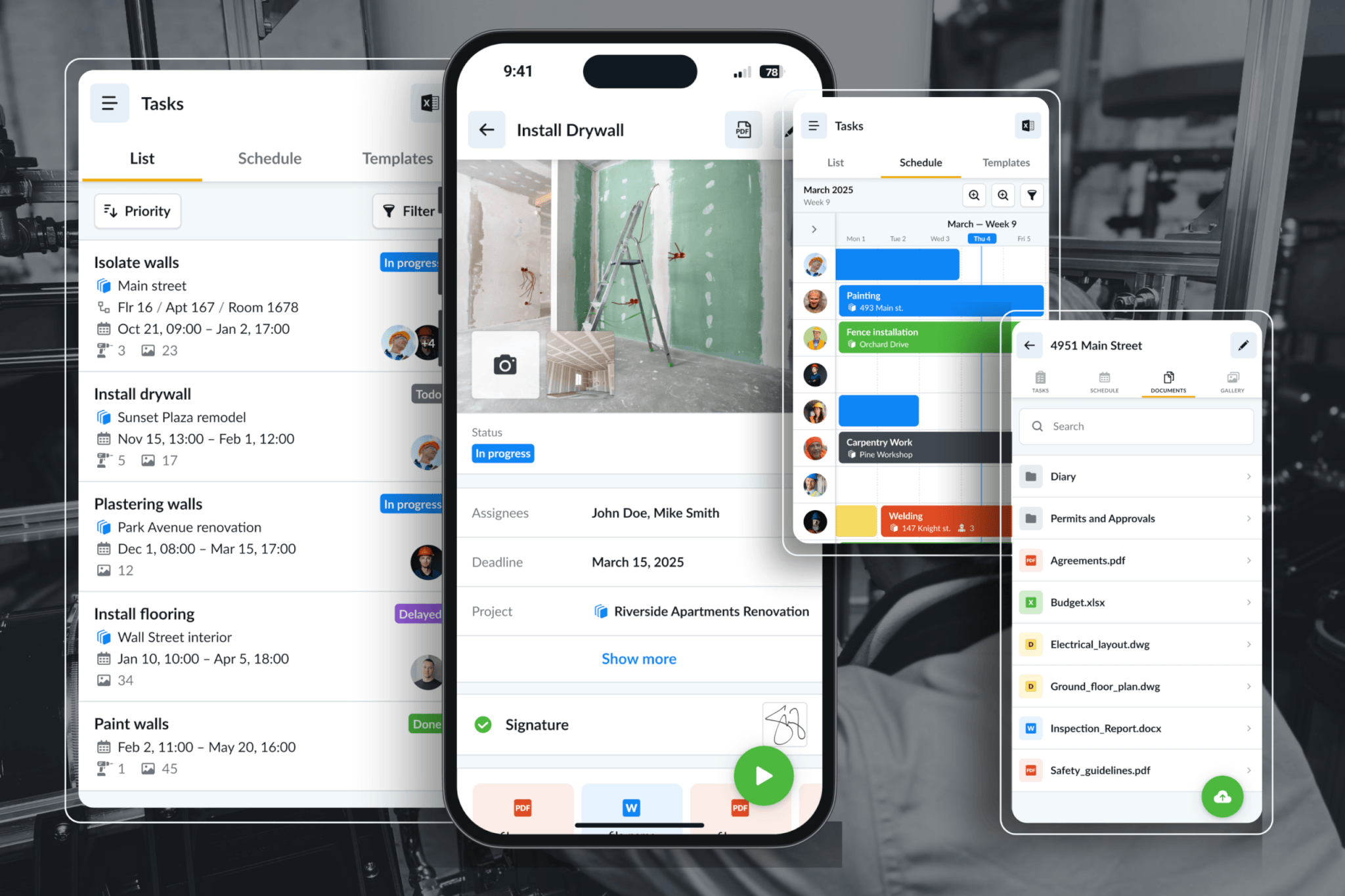
Modern remote task assignment in construction solves a different problem than most managers expect. It is not primarily about sending digital to-do lists to workers. The stronger value is turning every field task into a documented work package – assign the work, link it to a specific location, track materials and tools, collect photos automatically and export a professional report when the job is done.
Remote task assignment in construction means a project manager, foreman, or business owner can create, assign, and monitor field tasks from any location – without being physically on site. It is one of the simplest ways to manage sites without being everywhere while keeping tasks, locations, photos, materials, and updates connected.
A well-structured construction task is a container for everything connected to that specific piece of work:
| Field | What it captures |
|---|---|
| Project | Which site or contract this belongs to |
| Location | Building, floor, apartment, room, zone |
| Task description | What needs to be done |
| Assigned crew or worker | Who is responsible |
| Deadline or priority | When and how urgently |
| Planned materials | What the manager expects to be used |
| Tools or equipment | What tools are needed or assigned |
| Photos | Before, during, after documentation |
| Comments | Notes, changes, issues |
| Completion status | Not started, in progress, completed |
| Actual material usage | What was really used |
| Report data | Everything needed for a final project report |
When a task is structured this way, it becomes the single location where all information about that piece of work lives. The manager does not have to chase photos through WhatsApp, remember material usage from memory, or manually write reports on weekends. The documentation builds itself as the crew works.
Before going further, I think it is worth being honest about when digital task management is not necessary.
Verbal assignment is enough when:
A two-person crew that has been doing the same type of work together for five years does not need software to coordinate a straightforward installation. Their verbal system works because trust, familiarity and shared knowledge fill the gaps. Work tracking and scheduling issues are other difficulties that construction project managers need to solve early on, it can be hard to keep track of what is finished and what still needs to be done.
Digital task assignment becomes valuable when:
The clearest way to frame this is: verbal communication is still the right tool for explaining work. Digital task assignment is the right tool for commitment, tracking, proof, and reporting. Both can coexist and should.
The most important idea in this article is this: the task is not just an instruction. It is a folder.
When a construction task is built as a work package rather than a simple to-do item, it collects everything connected to that specific piece of work in one place:
The practical result is straightforward: assign the work once and automatically collect the proof, materials, tools and photos needed for reports. The crew does not produce extra paperwork. The manager does not reconstruct information after the fact. The report at the end generates itself from the project that already happened.
This is the change from task management as a scheduling tool to task management as a field documentation system.
Assigning tasks to construction crews remotely means giving the field team a clear work package without needing to be physically on site. In practice, this usually means creating a task inside a construction crew management app, assigning it to the right worker or crew, adding the jobsite location, and letting the crew update the task from the field.
The important point is that the task should contain the information the crew needs to do the work correctly and the information the manager needs later for proof, reporting, and follow-up.
A practical remote task assignment should include:
| Task detail | Example for an electrical company |
|---|---|
| Project | Riverside Office Renovation |
| Location | Floor 2, Meeting Room 204 |
| Task | Install sockets and lighting switch |
| Assigned crew | Electrical crew A |
| Planned materials | 8 sockets, 1 switch, 35m cable, 12m conduit |
| Tools | Tester, drill, cable puller |
| Required photos | Before wall closure, finished installation, test result |
| Status | Assigned, in progress, completed |
| Actual usage | 38m cable used, 8 sockets installed |
| Report data | Photos, materials, crew, date, notes |
The basic workflow is simple:
Read more: If you are still using paper, Excel, or WhatsApp to manage construction tasks. It includes a free template and explains what a good task list should contain, such as task name, responsible crew, work location, status, dates, notes, and photo/document references: Construction Task List & Schedule: Free Template
The easier way = use Remato App.
The value of remote task assignment depends heavily on the type of construction company. It is most useful for specialty contractors whose work is location-based, material-based, repetitive, and documentation-heavy. Construction site managers face many challenges when assigning work. They handle diverse teams, with each member bringing different skills and experiences. Coordinating several tasks at once requires knowing each team member’s abilities and when to execute tasks.
Below are practical examples across different trades.
Their work is often structured by:
building → floor → apartment → room → system component
Progress is hard to track verbally at scale. The value is strong because work is repeated across many apartments or rooms. Materials are measurable. Photos can prove quality before ceilings or walls are closed. Handover reports are useful for clients, general contractors, and future service work.
Insulation companies also benefit from documented work packages, especially when work becomes hidden after the next construction stage.
This applies to:
Once the insulation goes in and the wall or ceiling is closed, nobody can see it again. A client who claims the insulation is the wrong thickness six months later is impossible to argue with – unless there are timestamped photos taken at the task level before covering. Planned versus actual m² tracking per zone also catches material waste that is easy to miss when materials are ordered in bulk.
Task-linked documentation helps prove:
Solar installations involve multiple crews handling different parts of the same project – mounting, panel placement, inverter wiring, commissioning – often at different times. Each phase benefits from a task per roof section with required photos and tool checklists. Panel serial numbers can be logged per task and location. The resulting report covers permit documentation, photo proof of installation, and client handover all in one export. This is documentation many solar companies are already legally required to produce – task-based collection means it builds itself during the work rather than being assembled manually afterward.
Electrical work is heavily inspected and highly liable. Circuits, panels, sockets, and conduit routes get installed and immediately covered by walls and ceilings. The inspector asks who installed a specific circuit and when. If there is no record, the answer is “we don’t know.” Tasks per room or circuit, with photos taken before walls close, create a traceable installation record. Cable lengths, conduit, breakers, and switches tracked against estimates also help explain material costs on large projects.
Typical electrical tasks include:
| Task | Materials | Documentation |
|---|---|---|
| Rough-in wiring | Cable, conduit, boxes | Photos before wall closure |
| Install sockets and switches | Sockets, switches, covers | Room-level completion photos |
| Install panel | Breakers, labels | Panel photos |
| Test circuit | Testing device | Test result record |
| Fix punch-list item | Replacement parts | Before/after photos |
Plumbing shares the hidden work problem with electrical. Pipe routes, drain layouts, and fitting configurations get covered before anyone else sees them. Disputes about incorrect pipe diameters, wrong routing, or uncompleted sections are common in construction, and without pre-coverage photos they are essentially unresolvable. Tasks per bathroom or zone, with photos of pipe routes and pressure test gauges, create the warranty and dispute protection that plumbing contractors need but rarely have.
Example plumbing tasks:
| Task | Planned materials | Photos |
|---|---|---|
| Bathroom pipe rough-in | Pipe, fittings, valves | Pipe route photos |
| Install drain lines | Drain pipe, elbows, brackets | Slope and connection photos |
| Pressure test system | Test pump | Gauge result photo |
| Install fixtures | Toilet, sink, taps | Final photos |
Fire protection work carries among the strongest compliance requirements of any trade. Sprinkler heads, fire alarm devices, firestopping materials, emergency lights, and extinguisher placements must all be documented for inspection sign-off and certification.
Their work can include:
The location record must be exact. Tasks built per zone or floor with required photos at each stage turn the field work directly into inspection documentation. The export report functions as the completion certificate – something that previously required hours of manual compilation.
Large facade projects involve installing dozens or hundreds of individual window or door units. Tracking which units are installed, which have sealing completed, which have defects flagged and which are pending is impossible on paper at scale.
Photos connected to the exact task and location help prove that the installation was completed correctly.
For facade and window companies, the strongest value is product-location traceability and warranty documentation.
Roofing presents a particular documentation challenge: clients almost never see the actual installation. They cannot inspect a flat roof membrane or verify flashings themselves. Photo documentation is therefore the only way to communicate quality and prove completion. Before and after photos per roof section, weather condition notes linked to tasks, and material quantities per area create a client handover report that roofing companies almost never produce today but that would significantly reduce disputes. Warranty claims also become substantially easier to handle when there are photos of the original installation.
Remote task assignment helps managers track progress without climbing onto every roof. It also helps create client trust by showing clear proof of work.
Flooring, tiling, and finishing companies may not always need tool tracking, but they benefit from room-level task documentation, especially on large residential, hotel, office, or commercial fit-out projects.
This is especially useful for defect tracking and client approvals.
Finishing work often creates many small issues near the end of a project. A task-based system helps make sure every defect is assigned, fixed, photographed, and included in the final report.
For these trades, the value is less about complex tools and more about location-based progress, material batches, defect proof, and client sign-off.
Construction crews do not always need digital task management. For small, stable teams doing familiar work on a single site, verbal coordination often works well and does not need replacing.
But as soon as work spreads across multiple crews, sites, rooms, subcontractors, materials, tools, photos, and reporting requirements, verbal assignment starts to break down. Instructions get scattered across calls and WhatsApp messages. Photos are hard to find later. Material use is unclear. Reports have to be rebuilt manually after the work is already done. And when there is a dispute, inspection, warranty claim, or client question, the proof may not exist.
This is where Remato adds value.
Remato helps construction companies assign tasks remotely while also keeping the important field information connected to the task itself. Instead of only telling a crew what to do, a manager can create a clear work package with the project, location, responsible crew, planned materials, tools, photos, time records, and completion status all in one place.
That means remote task assignment becomes more than a digital instruction. It becomes a practical way to document the work as it happens.
Different trades benefit from this in different ways. Ventilation and plumbing contractors can document work before it gets covered. Solar and electrical companies can keep clearer installation and testing records. Fire protection companies can support compliance and inspection needs. Roofing companies can show clients work they cannot easily inspect themselves. Flooring and finishing companies can manage room-level progress and punch-list items more clearly. The trigger pain may be different, but the structure is the same: assign the task, document the work, and keep the proof connected.
The real value of Remato is that it helps turn every field task into a documented work package. The task is not just an instruction. It becomes the place where proof of work, photos, materials, tools, time, and completion records are collected naturally – so when a client asks, an inspector checks, a warranty issue appears, or a report is due, the information is already there.