{{ post.date }}
{{ post.readTime }}

It’s 16:30 on a Friday. Your crews are heading home, but your real work is just beginning.
You’re sitting in your van or at a cluttered desk, surrounded by a mountain of “data” that looks more like a crime scene. There are smudged, coffee-stained notes, a dozen “I worked 8 hours” WhatsApp messages, and a few scraps of cardboard with scribbled tallies.
To you, this is just “the way construction works.” To your bottom line, it’s a bleeding wound.
Most SME construction owners view manual timesheets as a minor annoyance—a “free” task they handle in their spare time. But here is the cold, hard truth: If you are still using paper, pens, and memory to track your labor, you are paying a “Paperwork Tax” of at least two billable hours every single day.
That’s 10 hours a week. Over 40 hours a month. Essentially, you are losing one full week of high-level management time every single month just to figure out who was standing where on Tuesday at 09:00.
In an industry where margins are being squeezed by rising costs and a brutal labor shortage, you can’t afford to be a professional data entry clerk. It’s time to look at what those “free” paper timesheets are actually costing you.
Where exactly do those 120 minutes go? It isn’t one giant mistake; it’s a “death by a thousand cuts.” When you rely on manual tracking, your day is eaten away by four specific stages of friction.
Construction happens fast. By the time a worker sits down at 17:00 to write what they did at 08:30 on Monday, the details are blurry.
Once those notes reach the office, the translation begins.
Moving data from a scrap of paper or a WhatsApp message into an Excel sheet or accounting software is the ultimate productivity killer.
Three weeks later, a subcontractor or employee disputes their pay, or a client questions why a “simple” task took 12 hours.
When you add it up, you’re losing 2 hours every day to the sheer gravity of paper. That is time that could be spent on billable work that actually grows your business.
The 2-hour leak is just the time you waste. The real damage happens in the figures you lose. Manual timesheets don’t just eat your schedule; they actively drain your bank account through three invisible financial leaks.
On a paper timesheet, nobody ever finishes work at 16:52. Every shift miraculously ends at exactly 17:00.
Without a digital log linked to a specific site, it’s impossible to tell the difference between “Work Time” and “Windshield Time.”
This is the biggest profit killer of all. A client asks for “one quick thing” on-site at 10:00. The crew does it, finishes at 11:30, and then forgets to mention it because they are rushing to the next task.
Imagine reinvesting that time into:
The biggest problem with manual timesheets isn’t just that they are slow, it’s that they are historical. When you collect paper sheets on Friday, you are looking at “financial ghosts” from Monday. By the time you realize a project is over budget, it’s already too late to fix it.
If a job was estimated to take 40 hours, but by Wednesday at 14:00 your crew has already logged 38, you need to know now. With paper, you won’t find out until the following week. At that point, you’ve already bled 20 hours of overage that you can’t get back.
Sometimes a crew is on-site but isn’t working because a delivery is late or a sub-contractor is in the way.
When a client asks at 15:00 on a Thursday, “How are we doing on the budget?”, the manual owner has to say, “Let me check the notes and get back to you next week.” The digital owner opens an app and says, “We are at 65% of the labor budget and exactly on schedule.”
The Difference: One sounds like a “man with a van”; the other sounds like a professional firm that is in total control of the project.
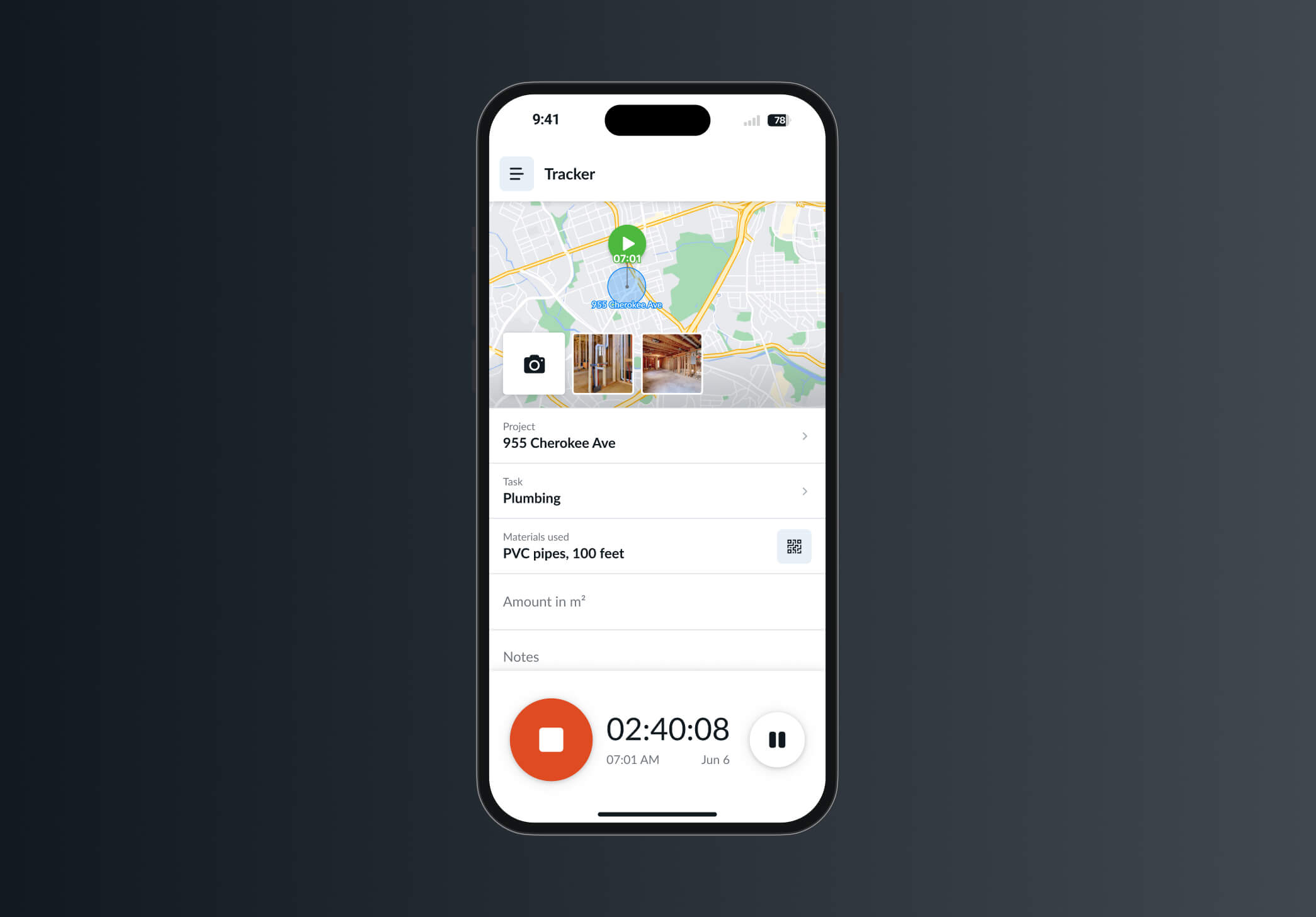
If you want to stop the “Paperwork Tax,” you have to stop bringing the paperwork home. The solution isn’t to work harder at your desk at 20:00; it’s to make the data capture so easy that it happens naturally at 08:00 on the job site.
This is where moving from a manual process to a field-first tool like Remato changes the game.
Instead of guessing on Friday, your crew taps a button at 07:30 when they arrive. The data is captured instantly. There is no memory gap because there is nothing to remember—the system does the heavy lifting.
The moment a worker clocks out at 16:00, the office sees it. There is no “Deciphering Act.” You don’t have to wait for a physical piece of paper to travel from a van to your desk. You can see your labor costs for the day before you even finish your afternoon coffee.
Digital tools use GPS-stamped entries. You don’t have to call your foreman to check if the team is on-site; the map tells you they arrived at 08:05. This builds trust and removes the need for awkward “Where are you?” phone calls that interrupt the workflow.
When a client asks for that extra bit of demolition at 11:00, the crew can snap a photo and add a note to their time log instantly. This turns a forgotten “favor” into a documented, billable event that automatically shows up when it’s time to invoice.
In today’s market, labor is likely your biggest expense and your biggest risk. You wouldn’t leave your warehouse unlocked overnight, so why leave your labor hours unmanaged?
The two hours you are losing every day to manual timesheets aren’t just “part of the job”, they are a choice. By shifting to a digital, field-first system, you reclaim your time, protect your margins, and finally get an accurate picture of what your business is actually doing.
Stop chasing hours. Start managing projects.
This is the most common concern. The key is simplicity. Most workers find that tapping a “Start” button at 07:00 is much easier than trying to find a pen and a crumpled piece of paper at 16:30. If they can use WhatsApp or a banking app, they can use a field-first tool like Remato. Usually, once they see it ensures their pay is accurate and on time, the resistance disappears.
It’s not about “spying”; it’s about verification and safety. GPS-stamped entries protect the workers just as much as the owner. If there is an insurance claim or a dispute about site presence, the digital record is their best defense. It moves the culture from “monitoring” to “accountability.”
As we broke down in the “Paperwork Tax” section, paper isn’t free—it’s actually costing you thousands in wasted administrative time and “rounded-up” hours. Most SMEs find that the software pays for itself within the first month just by eliminating 15 minutes of “rounding” per worker per day.
Good construction software is built for the field. If a worker clocks in at 08:00 in a dead zone, the app stores the data locally on the phone and syncs it to the office the moment they get back into range. You never lose a minute of data.
On average, owners and admins report a 70-80% reduction in time spent on payroll and project costing. Instead of spending three hours on a Monday morning manually entering data, you simply review the digital logs, click “Approve,” and export the data to your accounting software.